Pure White Background
#FFFFFFWhite backgrounds are the global e-commerce standard because they reduce visual noise, make product colours appear accurate, and comply with marketplace image policies on every major platform.
Turn any cluttered, messy, or distracting background into a perfectly clean white, grey, or transparent background in under 5 seconds. No Photoshop. No design skills. No cost. Just upload your photo and get a studio-quality clean background instantly.
Opens Scenith AI · Results in ~5 seconds

A background remover for clean backgrounds is an AI tool that detects the subject of a photo, removes the original background regardless of how cluttered or complex it is, and outputs a transparent PNG. The subject can then be placed on any clean background — pure white, studio grey, transparent, or a custom brand colour — producing professional-grade imagery without photography studios or editing software.
Most photos are taken in real environments — not photography studios. Here's every type of messy background the AI removes, and what replaces it.
Cluttered home office or bedroom
✅ Replace with clean white or branded solid
Busy outdoor / nature backgrounds
✅ Extract subject for studio-clean result
Warehouse or storage room shots
✅ Marketplace-compliant white background instantly
Patterned furniture or carpet
✅ Isolate subject for neutral professional backdrop
Street scenes or crowded locations
✅ Remove all environmental distraction cleanly
Uneven studio lighting gradients
✅ Replace with perfectly even solid background
Beach, water, or outdoor lifestyle
✅ Keep subject, swap to commercial-use background
Bookshelves or cluttered desks
✅ Clean white backdrop for professional headshots
The right clean background depends on your use case. Here's a definitive guide to every background type, when to use it, and why it works.
#FFFFFFWhite backgrounds are the global e-commerce standard because they reduce visual noise, make product colours appear accurate, and comply with marketplace image policies on every major platform.
PNG AlphaTransparency is the most flexible output — place your subject on any colour, texture, or scene in any design tool. Ideal for logos, social media graphics, and multi-use content libraries.
#F2F2F2 – #E0E0E0Light grey prevents white products from blending into white backgrounds, adds subtle depth, and is the preferred choice for premium product catalogues and fashion photography.
#1A1A1A – #000000Dark backgrounds create dramatic contrast for premium products, enhance metallic and glass surfaces, and perform strongly in luxury advertising and high-end brand photography.
Custom HEXBrand-consistent backgrounds across all content instantly communicate professionalism and brand identity. Transparent PNG output gives you full control to apply any brand colour in any design tool.
Custom patternTransparent subject composited onto a curated texture or gradient creates scroll-stopping visual content. The clean subject extraction from Scenith AI ensures seamless blending with any background texture.
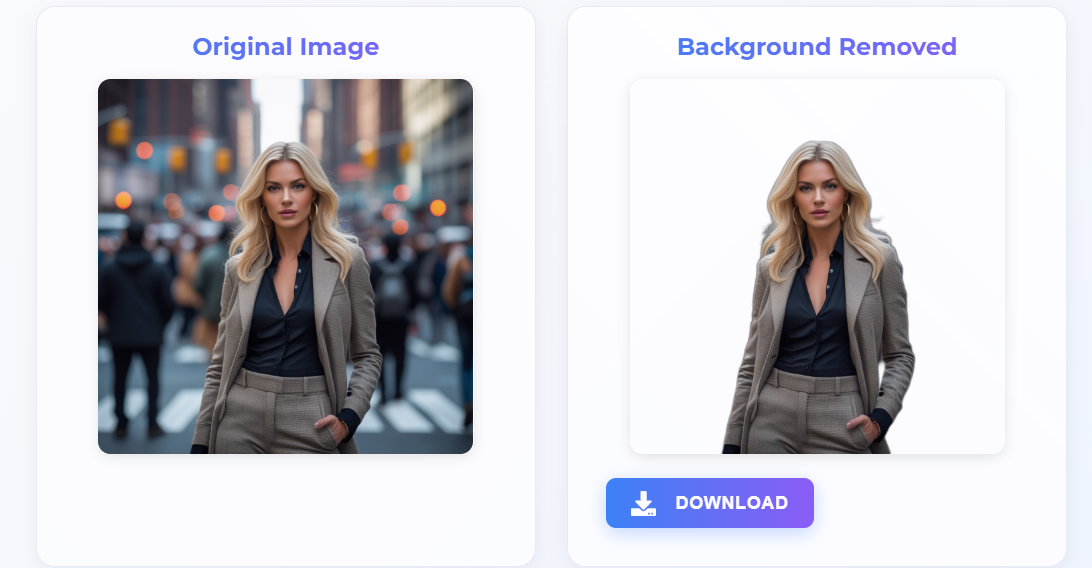
From messy background to studio-clean result in under 5 seconds — here's exactly how it works.
Click "Get a Clean Background — Free" to launch the Scenith AI tool directly. No no app installation required.
Upload your photo with the messy, cluttered, or distracting background (JPG or PNG, up to 30MB). Works with portraits, products, pets, objects, and more.
The Scenith AI model instantly detects your subject and removes everything behind it — messy rooms, busy streets, cluttered desks — leaving a perfectly clean transparent PNG in under 5 seconds.
Download the transparent PNG and open it in any design tool, or use Scenith's image editor to fill the background with pure white, studio grey, or any brand colour you need.
Clean backgrounds aren't just for product photographers. Here's how professionals across every discipline use background removal to produce cleaner, higher-performing visuals.
Amazon requires pure white (RGB 255,255,255) as the main image background. Flipkart, Meesho, Myntra, and Shopify all recommend white or neutral backgrounds. AI background removal is the fastest way to produce compliant, conversion-optimised product images at scale.
A professional headshot taken at home against a messy wall becomes studio-quality in seconds. Replace the background with white, grey, or blurred neutral — no photography studio, no Photoshop subscription, no experience needed.
Ad creatives with clean background subjects outperform cluttered images in every A/B test metric — CTR, CPC, ROAS. Isolated subjects on clean or solid-colour backgrounds direct attention to the product, increasing conversion intent.
Clean background images in PowerPoint, Google Slides, and reports look intentionally designed rather than copy-pasted from the internet. Transparent subject images layer seamlessly over slide backgrounds for professional-grade output.
How Scenith AI stacks up against every other way to get a clean background on your photos.
| Method | Time per Image | Cost | Quality | Skill Required |
|---|---|---|---|---|
| Manual Photoshop Masking | 15–45 min per image | $54.99/mo subscription | Excellent (with skill) | Expert required |
| Canva Background Remover | ~10 seconds | $12.99/mo (Pro only) | Good | Beginner friendly |
| Remove.bg | ~5 seconds | Watermarked free / $9+ paid | Good | Beginner friendly |
| Scenith AI (Free) | ~5 seconds | 100% Free, no watermark | Excellent | Zero skill needed |
These techniques take your clean background results from good to professional-grade.
Even a white wall or plain bedsheet gives the AI more contrast to work with, resulting in sharper subject edges and cleaner extraction — particularly around fine hair, fur, and transparent materials.
Higher resolution means more pixel data at the edges, which translates to cleaner, more accurate segmentation. Avoid screenshots — use the original camera file or exported image wherever possible.
A subject shot in warm indoor lighting placed on a cool white background looks unnatural. Match the white balance and brightness of your replacement background to the original lighting for photorealistic results.
A 10–15% opacity drop shadow placed behind your isolated subject on a clean white background adds depth and prevents the "floating product" look that signals amateur editing to buyers.
Understanding the technology helps you get better results and know its limits.
Removing a background to get a clean result sounds simple — but the technical challenge is substantial. The AI must correctly identify every pixel that belongs to the subject versus the background, even at the boundary where subject and background colours can be nearly identical. Fine hair, translucent fabric, reflective surfaces, and soft shadows all create ambiguous pixels that naive tools misclassify.
Scenith uses semantic segmentation — not colour-matching or simple contrast detection — which means the model understands what is in the image, not just what colour it is. This is why it correctly handles a white shirt photographed against a white wall, or a glass bottle on a reflective surface, where colour-based tools fail completely.
There is an important distinction between simply removing a background (making pixels transparent) and achieving a genuinely clean background result. A clean result requires three additional elements beyond basic removal:
Stop letting cluttered backgrounds undermine your professional image. Use Scenith's free AI background remover to get perfectly clean white, transparent, or custom-colour backgrounds in seconds — no Photoshop, no studio, no cost.
✨ Get a Clean Background — Free →No watermarks · Full commercial rights · Results in ~5 seconds
A clean background in photography refers to a background that is free from clutter, distraction, or visual noise — typically a solid white, grey, black, or neutral colour that keeps all viewer attention on the subject. Clean backgrounds are standard in product photography, professional portraits, and e-commerce imagery.
The fastest way to get a clean white background on any photo is to use an AI background remover. Upload your photo, the AI removes the original background and outputs a transparent PNG, then you place the subject on a white canvas in any design tool. Scenith does this in under 5 seconds for free.
Yes. Scenith AI removes the background from your photo without Photoshop, without any design skills, and without any cost. Upload your image, get a transparent PNG in seconds, then fill the background with any solid colour using a free tool like Canva, Adobe Express, or Scenith's own image editor.
The Scenith AI handles virtually any background type: cluttered home offices, busy street scenes, messy studio setups, outdoor environments with complex foliage, uneven gradient backdrops, and low-contrast scenes. The AI uses semantic segmentation rather than colour detection, so it works even when the subject blends with the background colour.
Pure white (RGB 255,255,255) is the standard for e-commerce and product photography. Light grey (RGB 242,242,242) works better for white or silver products. Transparent background gives maximum flexibility for design. For personal branding and social media, a colour matching your brand palette creates strong visual consistency.
Yes. Scenith's AI background remover is completely free with no watermarks, no subscriptions, and no usage limits. The output transparent PNG gives you full commercial rights to use on any project — product listings, marketing materials, or personal use.