Stop the Scroll Instantly
Research consistently shows that images with clean, uncluttered subjects halt thumb-scrolling more effectively than busy backgrounds. Isolated subjects command attention in a feed full of noise.
The fastest way to create scroll-stopping social media content. Remove any background from your photos in under 5 seconds — then place your subject on branded colours, gradients, or any scene. Perfect for Instagram, TikTok, LinkedIn, YouTube, and Facebook. Free, no watermarks.
Opens Scenith AI · Works on mobile
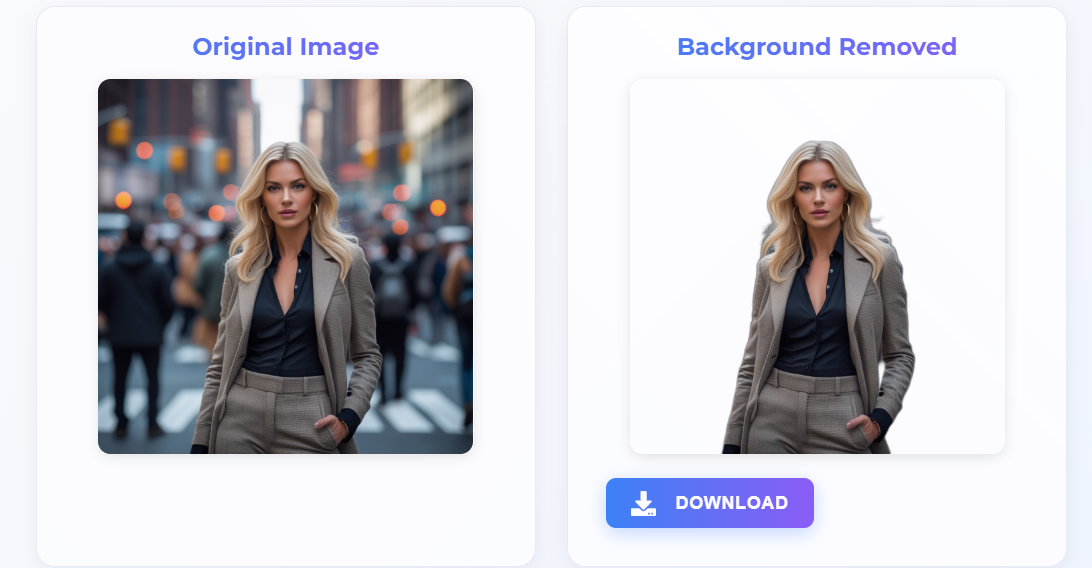
A social media background remover is an AI tool that automatically isolates the subject of a photo — a person, product, or graphic — and removes the background, outputting a transparent PNG file. Content creators use it to swap backgrounds for branded aesthetics, compose layered graphics, and produce professional-looking posts for Instagram, TikTok, LinkedIn, YouTube, and Facebook without design software.
More saves on Instagram posts with consistent background aesthetic
Higher CTR on Pinterest shopping pins with clean white backgrounds
More LinkedIn profile views with a professional isolated headshot
YouTube thumbnail CTR improvement with isolated subject formula
Social media is a visual attention economy. Background removal is the single fastest way to upgrade your content quality and consistency — without a photography studio or design degree.
Research consistently shows that images with clean, uncluttered subjects halt thumb-scrolling more effectively than busy backgrounds. Isolated subjects command attention in a feed full of noise.
The most recognisable creator accounts and brand pages share one trait: visual consistency. Transparent backgrounds let you apply the same signature colour palette across every single post.
High save rates and share rates signal quality to every platform algorithm. Professional-looking posts with clean backgrounds earn more saves, which drives organic reach without paid promotion.
Without background removal, a single branded social post requires a photo studio, a designer, or hours in Photoshop. AI does it in 5 seconds — letting you batch 30 posts in the time it used to take for one.
Transparent subjects open up an entire creative toolkit: layered Reels covers, product-over-text graphics, animated Stories stickers, and multi-subject collages that look agency-made.
A single professionally shot and edited photo can cost ₹2,000–₹10,000. AI background removal lets any creator produce studio-quality visuals from a smartphone, anywhere, for free.
Each social media platform has unique image dimensions, use cases, and audience expectations. Here's exactly how to use background removal to maximise performance on each one.
Clean backgrounds on feed posts boost saves and shares. Transparent PNGs let you match your grid aesthetic perfectly.
TikTok thumbnails with isolated subjects get significantly higher click-through rates in Explore and search.
A professional white or branded-colour background on your LinkedIn headshot increases profile views by up to 21×.
Facebook ad images with isolated subjects against bold backgrounds achieve lower CPM and higher CTR than busy lifestyle shots.
The most viral YouTube thumbnails follow the "face + object + text" formula — all requiring transparent isolated subjects.
Pinterest product pins with clean white or neutral backgrounds outperform lifestyle pins in shopping conversions by 40%.
No Photoshop, no Canva Pro, no design experience. Just your photo and 5 seconds.
Click "Remove My Background Now" to open the Scenith AI tool. No app download, works on any device.
Upload your selfie, content creator photo, product image, or graphic (JPG/PNG, up to 30MB). Works with portrait shots, flat lays, and branded graphics.
Scenith AI identifies your subject and removes the background with pixel-level precision, preserving fine hair details, clothing edges, and complex silhouettes.
Download your transparent PNG and drop it onto any background — a gradient, a branded colour, a travel photo — perfect for Instagram, TikTok, LinkedIn and more.
Whatever you create — selfies, products, ads, or thumbnails — the AI handles it.
Replace boring walls and messy rooms with on-brand backgrounds instantly
Isolate products for shoppable posts on Instagram and Pinterest
Extract icons, illustrations and graphics for compositing in Canva
LinkedIn-ready portraits with any background in seconds
Logos, stickers, and design elements with clean transparent edges
Paid social ad images with isolated subjects that beat banner blindness
YouTube and TikTok thumbnails with the proven isolated-subject formula
Transparent PNGs perfect for layering in CapCut, Canva or Adobe Express
Real content workflows that professional creators and social media managers use every day.
Shoot selfie or product → Remove background → Place on branded gradient or pastel → Export 1080×1350 → Post
Consistent aesthetic grid that converts followers to buyers
Screen-capture face from video → Remove background → Composite on bold colour with text overlay → Export 1280×720
CTR increase of 15–40% vs plain video screenshots
Take professional headshot anywhere → Remove background → Apply neutral grey or white → Export for profile/posts
Up to 21× more profile views with professional isolated headshot
Export cover frame → Remove background → Add vibrant colour + text → Use as video thumbnail
Higher browse-page impressions and video click-through rate
Avoid these errors to get professional, platform-ready results every time.
✅ Fix: Always start from the original full-resolution photo. Screenshots are compressed and lose detail at the edges — exactly where AI segmentation needs the most clarity.
✅ Fix: Instagram and TikTok do not support transparency — they will fill it with black. Always place your transparent subject on a background colour or texture before exporting.
✅ Fix: After removing the background, resize your canvas to platform specs before posting: 1:1 for Instagram feed, 9:16 for Stories/Reels, 16:9 for YouTube thumbnails.
✅ Fix: Pick backgrounds that complement your subject's outfit or brand colours. A colour wheel approach (complementary or analogous colours) beats random backgrounds every time.
Understanding why clean backgrounds perform better helps you make smarter creative decisions, not just aesthetic ones.
Human vision operates on a principle called figure-ground segregation — our brains automatically prioritise a clear subject against a plain background over a scene with competing visual elements. In a social media feed, this translates directly to scroll-stopping power.
When the background is removed and replaced with a solid or gradient colour, the brain processes the image faster, creates stronger memory encoding, and associates higher quality with the content — all before the viewer consciously decides to engage. This is why clean backgrounds correlate with higher save rates across Instagram and Pinterest data.
No major social platform publicly confirms that image quality is an algorithmic factor — but engagement metrics that are influenced by visual quality absolutely are. Instagram's algorithm weights saves and shares heavily over likes and comments. TikTok's For You algorithm prioritises completion rate and replays. LinkedIn's feed favours dwell time on posts.
All three of these signals are downstream of first impressions. A professional-looking thumbnail or feed image increases the probability of the initial tap, click, or pause — which then feeds higher-quality engagement signals back to the algorithm. Background removal is therefore not just an aesthetic choice — it is an algorithmic one.
Stop letting cluttered photos hold back your engagement. Use Scenith's AI background remover — built for creators — and produce scroll-stopping, platform-optimised content in seconds. Free, forever, no watermarks.
✂️ Remove Background for Social Media — Free →No watermarks · Works on Instagram, TikTok, LinkedIn & more
A social media background remover is an AI tool that extracts your subject (person, product, or graphic) from its original background and delivers a transparent PNG. You can then place the subject on any background — branded colours, gradients, textures — optimised for each social platform.
Instagram (posts, Reels covers, Stories), TikTok (thumbnails, profile pictures), LinkedIn (headshots, company posts), Facebook (covers, ads, posts), YouTube (thumbnails, channel art), Pinterest (pins), and Twitter/X (header images) all benefit significantly from clean transparent background images.
Yes. Studies show that images with clean, distraction-free subjects stop the scroll more effectively than cluttered backgrounds. Consistent branded backgrounds across posts also increase profile aesthetics and follower retention by up to 30%.
Upload the highest resolution version available. For Instagram posts use 1080×1080px or 1080×1350px, for Stories and Reels use 1080×1920px, for LinkedIn use 1200×628px, and for YouTube thumbnails use 1280×720px. Our AI processes all standard social media dimensions.
Yes. The transparent PNG output works on every social media platform and design tool — Instagram, TikTok, Canva, Adobe Express, Facebook Creator Studio, LinkedIn, Pinterest, and YouTube. One removal, infinite use cases.
Yes, completely free with no watermarks. Full commercial rights are included, meaning you can use the output images for sponsored posts, brand collaborations, and paid advertising without any restrictions.